SAP
Enhancing Meeting Room Check Efficiency
Summary
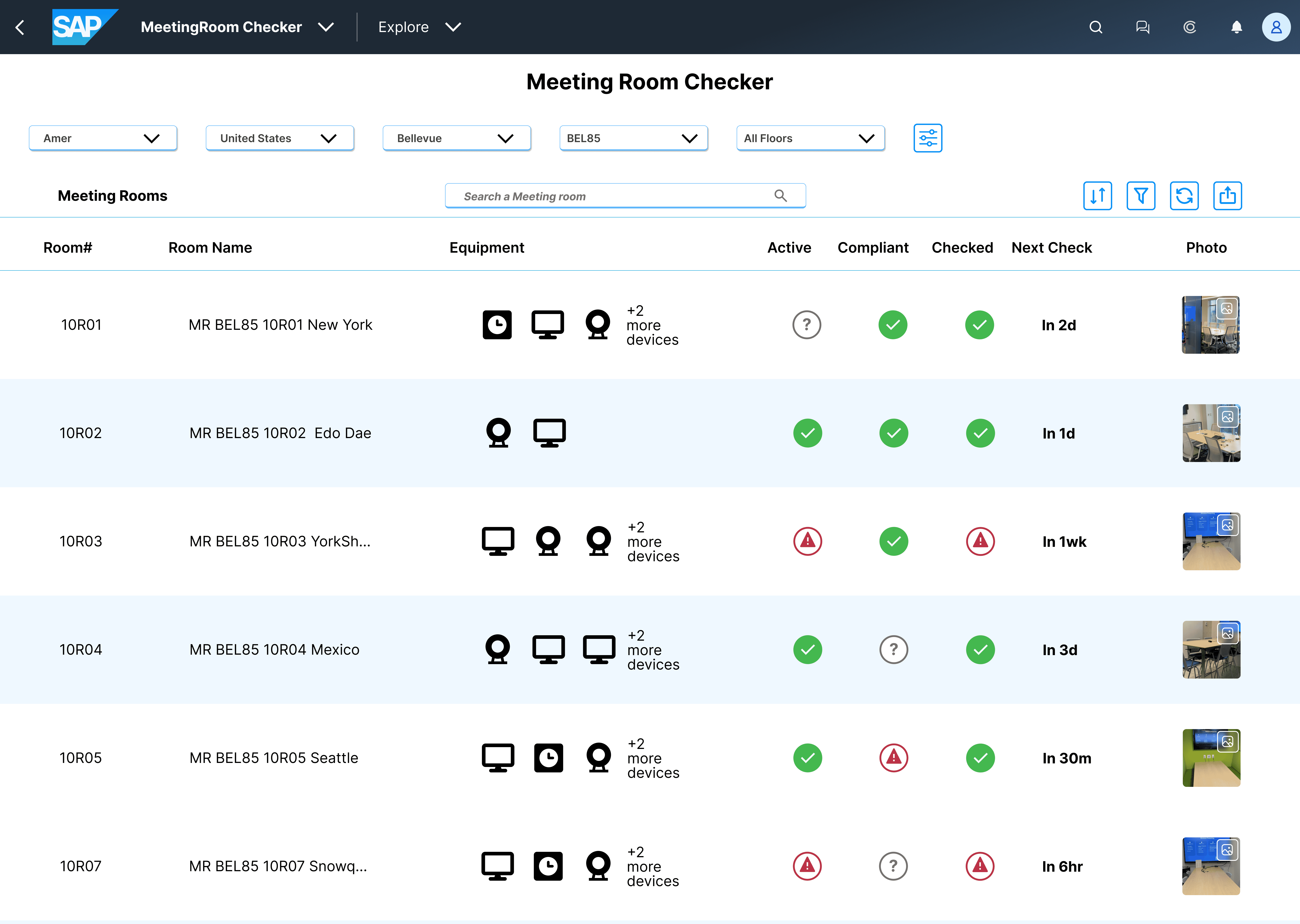
I designed a solution that removed ambiguous information, eliminated redundant actions users take to access meeting room timestamp information and improved the filter process to find specific rooms. I collaborated with technicians and engineers for this project.
I designed a solution that removed ambiguous information, eliminated redundant actions users take to access meeting room timestamp information and improved the filter process to find specific rooms. I collaborated with technicians and engineers for this project.
Role
UX Designer
UX Designer
Tools
Figma
Figma
Duration
Feb - March 2025
Feb - March 2025
Read Length
8 min
8 min
What did I do?
What did I do?
UX Research
User Interviews
Mobile Design
UX Research
User Interviews
Mobile Design
Wireframing
Prototyping
Usability Testing
Wireframing
Prototyping
Usability Testing
Overview
After a colleague voiced frustration with a web app for managing meeting room compliance, I empathized—having faced the same issue before in a prior role.
This shared challenge motivated me to start a project to streamline the process.
After a colleague voiced frustration with a web app for managing meeting room compliance, I empathized—having faced the same issue before in a prior role.
This shared challenge motivated me to start a project to streamline the process.
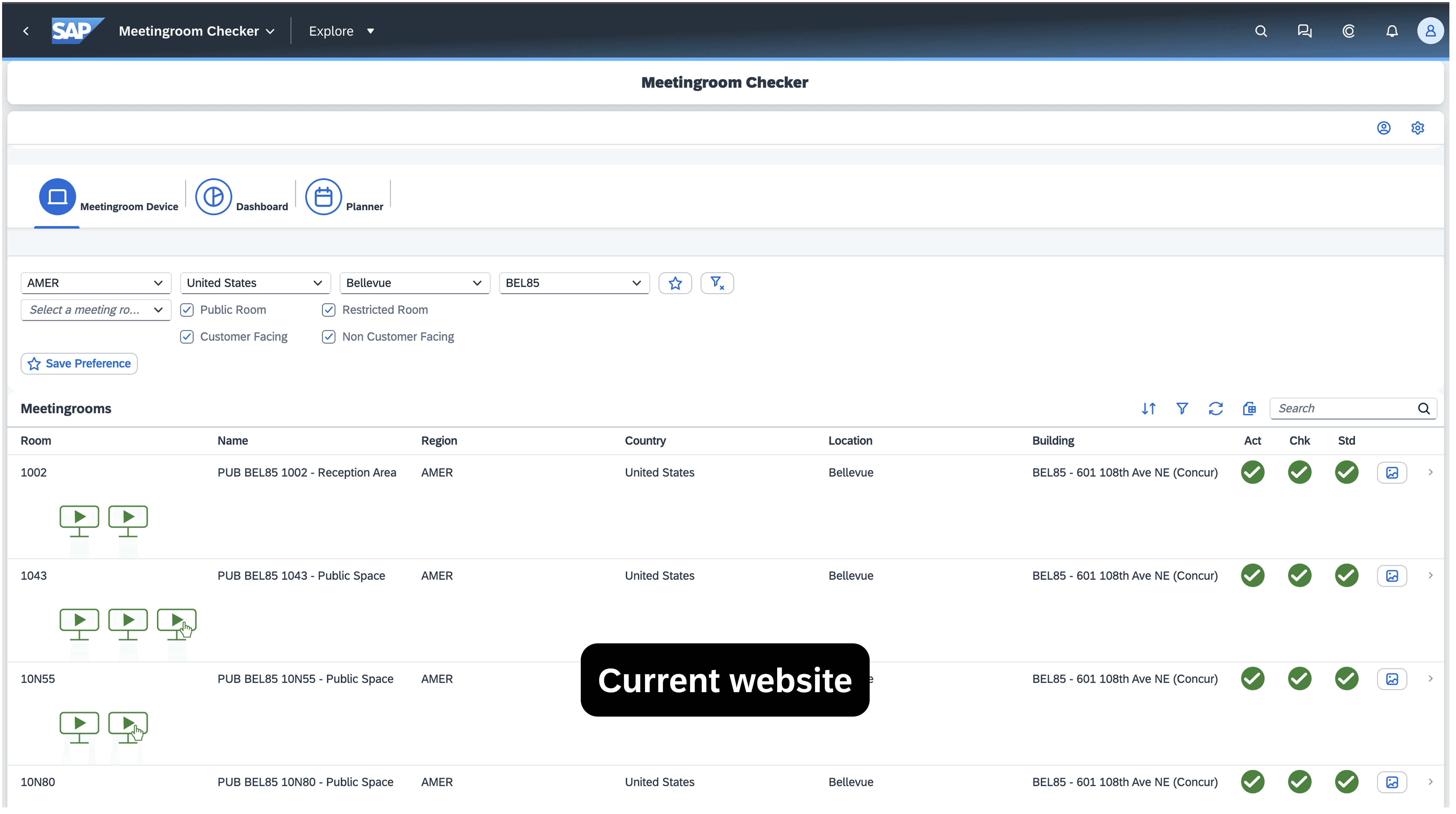
Current SAP Meeting Room Website
Current SAP MR Website
Defining the Problem
"Techs are not completing meeting checks on time."
"Techs are not completing meeting checks on time."
The IT team checks hundreds of meeting rooms daily to meet service agreements and avoid penalties. However, the filter button only shows overdue rooms or none at all, suggesting no action is needed. Technicians must click through several prompts to view timestamps and return, making the process slow and repetitive.
The IT team checks hundreds of meeting rooms daily to meet service agreements and avoid penalties. However, the filter button only shows overdue rooms or none at all, suggesting no action is needed. Technicians must click through several prompts to view timestamps and return, making the process slow and repetitive.
Painpoints
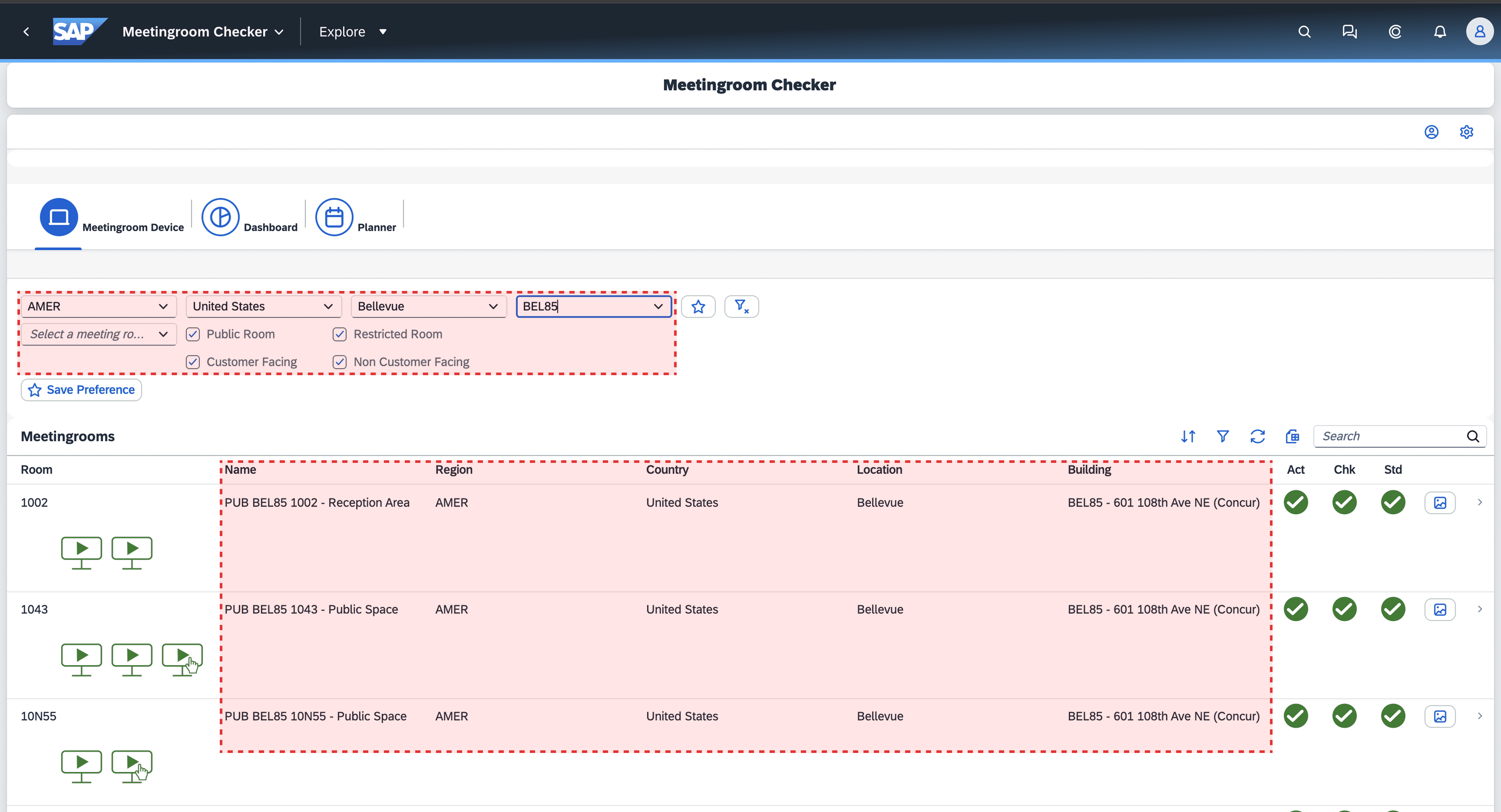
Redundant Information
Painpoints
Too many clicks to complete tasks
Painpoints
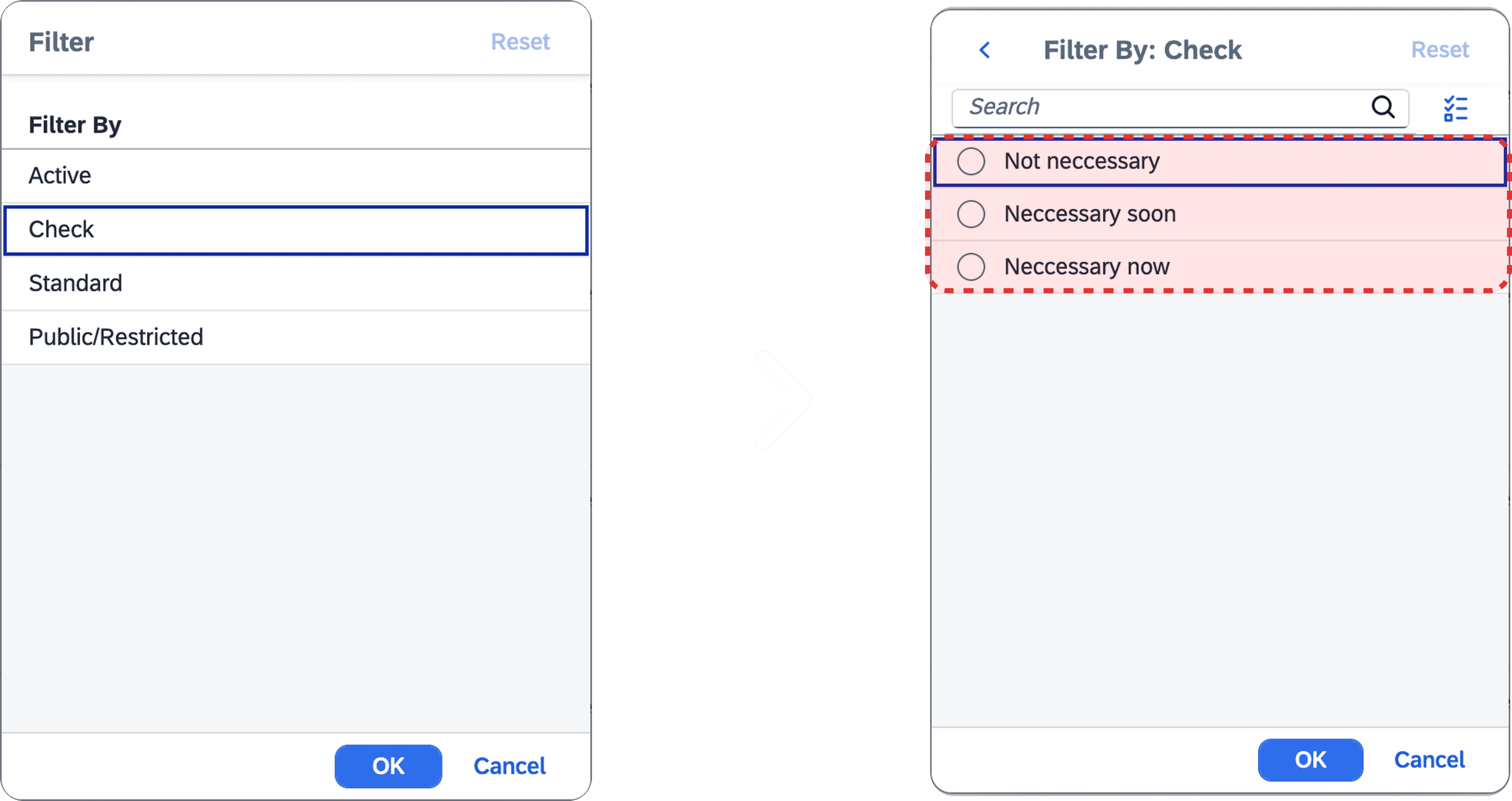
Filtering options is not reliable
Painpoints
Redundant Information
Painpoints
Too many clicks to complete tasks
Painpoints
Filtering options is not reliable
Objectives and Goals
Inefficient visibility and workflow in task management
Inefficient visibility and workflow in task management
Technicians lack clear, real-time insight into room statuses and must perform repetitive actions to access key information, slowing their ability to meet service targets.
Technicians lack clear, real-time insight into room statuses and must perform repetitive actions to access key information, slowing their ability to meet service targets.
Goal 1
Improve visibility of room status
Ensure technicians can immediately understand which rooms require attention
Goal 1
Improve visibility of room status
Ensure technicians can immediately understand which rooms require attention
Goal 2
Reduce interaction friction
Minimize the number of steps required to access critical information like timestamps or room details.
Goal 2
Reduce interaction friction
Minimize the number of steps required to access critical information like timestamps or room details.
Goal 3
Support Efficient Task Management
Enable quick filtering, prioritization, and navigation through meeting rooms that need checking or updates.
Goal 3
Support Efficient Task Management
Enable quick filtering, prioritization, and navigation through meeting rooms that need checking or updates.
Research and Insights
Understanding users
Interviews
I spoke with 4 IT technicians who use the Meeting Room Checker app. The goal was to understand their daily routine and what challenges they face when checking meeting rooms.
I spoke with 4 IT technicians who use the Meeting Room Checker app. The goal was to understand their daily routine and what challenges they face when checking meeting rooms.
Observations
I watched how the technicians actually used the app during their shifts. They shared their screens so I could see their real workflow. This helped me spot where they got stuck or slowed down, and I grouped these pain points into key themes.
I watched how the technicians actually used the app during their shifts. They shared their screens so I could see their real workflow. This helped me spot where they got stuck or slowed down, and I grouped these pain points into key themes.
Ideation and Concepts
How might we …
Reduce redundant data while still giving technicians quick access to critical details?

Reduce redundant data while still giving technicians quick access to critical details?
Design a workflow that minimizes clicks and context switching for technicians managing hundreds of rooms?

Design a workflow that minimizes clicks and context switching for technicians managing hundreds of rooms?
Clarify and simplify filter categories so technicians can easily find rooms that need attention?
Clarify and simplify filter categories so technicians can easily find rooms that need attention?
Solutions
3 key points to solve
Clarity and Relevance
Enable technicians to view only the most relevant, actionable information at a glance.
Enable technicians to view only the most relevant, actionable information at a glance.
Using Users’ Language
Clearly presenting all available product options to users so they can make informed choices with their purchases.
Clearly presenting all available product options to users so they can make informed choices with their purchases.
Familiar intuitive consistency
Creating social proof by showing customer reviews and ratings on products to build trust and support confident purchasing decisions.
Creating social proof by showing customer reviews and ratings on products to build trust and support confident purchasing decisions.
Usability Testing
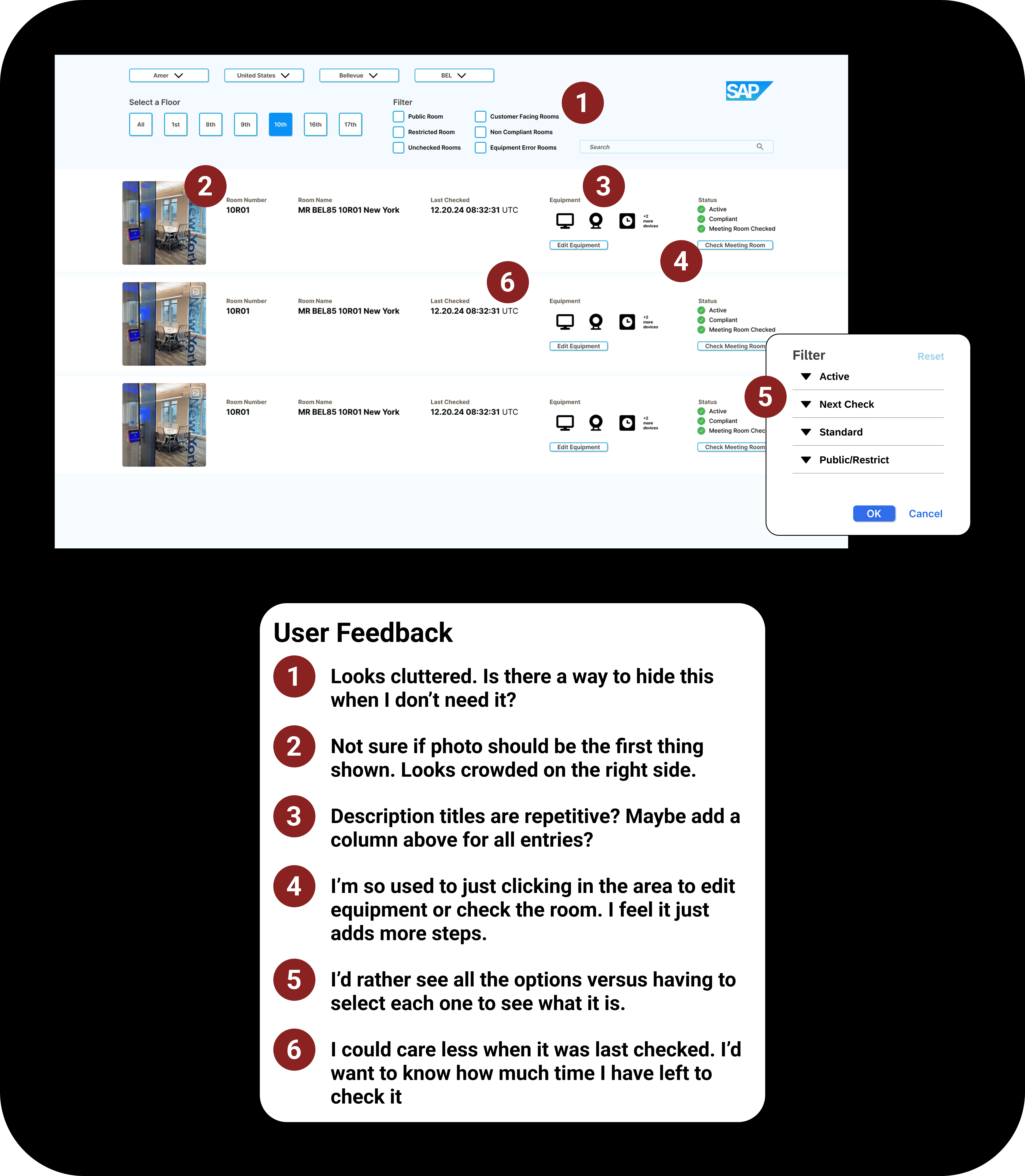

New Opportunity
Users preferred to see how much time they had to check a room rather than when it was last checked, so I incorporated that change into the final prototype.
Users preferred to see how much time they had to check a room rather than when it was last checked, so I incorporated that change into the final prototype.
MVP
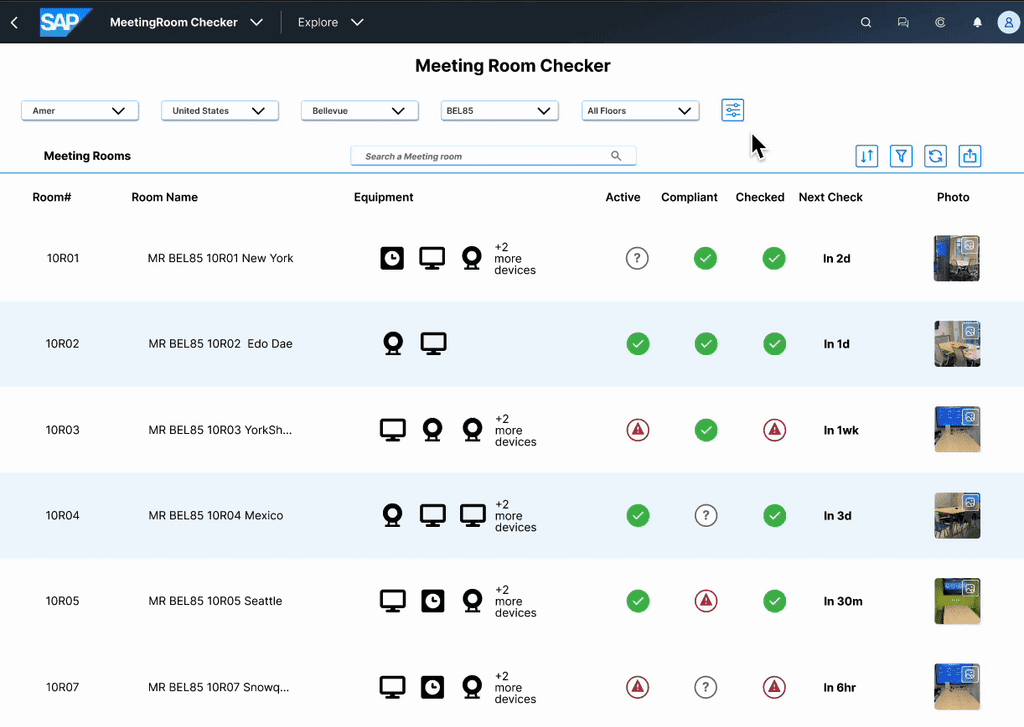
MVP
Solution 1
Information Hierarchy - Familiarity
Organized column order prioritizing information that technicians were used to viewing.
Organized column order prioritizing information that technicians were used to viewing.
Solution 1
Information Hierarchy - Familiarity
Organized column order prioritizing information that technicians were used to viewing.
Solution 2
Clarity and Actionable information
Information Availability - Clarity
Added a time column of when the room needs to be checked by.
Solution 2
Clarity and Actionable information
Added a time column of when the room needs to be checked by.
Solution 3
Discoverability - Information Visability
Filter categories will show all subcategories at start when filter button is clicked.
Solution 3
Discoverability - Information Visability
Filter categories will show all subcategories at start when filter button is clicked.

Challenges
Initial usability testing feedback was negative as they focused on visual changes rather than functionality.
Initial usability testing feedback was negative as they focused on visual changes rather than functionality.
Although I'd conduct more testing before making visual changes, I treated the users as stakeholders for this project as they were the ones actively using the application. I used it as an opportunity to collaborate and find a way to satisfy user familiarity and merging it with my design solution for functionality.
Although I'd conduct more testing before making visual changes, I treated the users as stakeholders for this project as they were the ones actively using the application. I used it as an opportunity to collaborate and find a way to satisfy user familiarity and merging it with my design solution for functionality.
Impact
Efficiency, clarity, and ease of decision-making
Efficiency, clarity, and ease of decision-making
I measured my solution with users to get some metrics. Below are the metrics I tested with users with my solution.
I measured my solution with users to get some metrics. Below are the metrics I tested with users with my solution.
Task Completion Time

75%
Reduced the time it takes IT technicians to find and check rooms by 20%
Task Completion Time
75%
Reduced the time it takes IT technicians to find and check rooms by 20%
Error Rate on missed meeting room checks

70%
Reduced missed meeting rooms that need to be checked by 70%
Error Rate on missed meeting room checks
70%
Reduced missed meeting rooms that need to be checked by 70%
Clicks per Task

40%
Reduced number of clicks from 12 to 7 to check rooms.
Clicks per Task
40%
Reduced number of clicks from 12 to 7 to check rooms.
Reflection
What did I learn?
What did I learn?
I learned during my research that users often say one thing but behave differently. I noticed this in interviews and observations, so I focused more on their actions, especially how they interact with apps.
I learned during my research that users often say one thing but behave differently. I noticed this in interviews and observations, so I focused more on their actions, especially how they interact with apps.
Future plans
Future plans
I plan to add snack bar notifications to subtly confirm users' actions, ensuring they know their input was received and preventing confusion.
I plan to add snack bar notifications to subtly confirm users' actions, ensuring they know their input was received and preventing confusion.